Sample editor
Sample editor
Using the popup on the tree of files in a project you can access the sample editor.
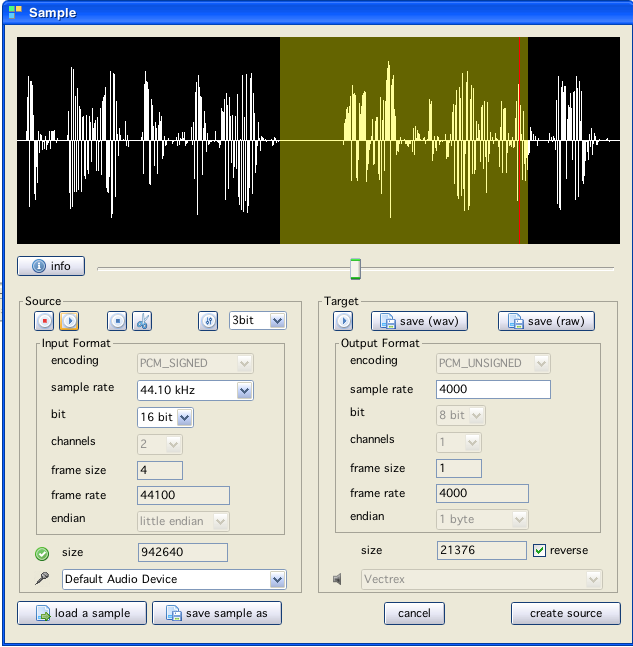
What you see is a gui to handle samples, handle means:
you are able to record samples on the fly (one can e.g. just talk to it (using a micro) after pressing the "record button")
you can also load (wav) sample files
you can "cut" selections of samples
you can play samples
you can "normalize" samples (no range compression though)
you can convert given samples to vectrex format (8 bit signed, one channel pcm)
you can set a desired sample rate
For one reason or another, the tooltips can not be displayed on modal windows in Vide, for that reason some more information about the gui:

start recording your samples (easiest with a microphone, select the audio device via the combobox besides the microphone icon) For recording you can also chose in what "setting" you want to record, above the microphone you can see whether your selection of settings is accepted:
 = unkown
 = ok
= ok
 = not ok

play a loaded or recorded sample

stop recording, or stop playing a sample

cut the selected area in from the sample (no undo)

do the above mentioned "normalization", selecting a number of bits "cuts" these numbers of bits from the top, and moves all samples "up" (it gets all louder) (no undo)
samples can only be loaded from "wav"- files (hm - never tried anything else though...)
Some general information:
Internally all samples are kept in the format:
44100 khz
2 channel
16 bit
signed
little endian
this is what you see in the sample display window (left channel)
Recording is done with the settings you enter to the right (and is than converted to above format)
(the original) samples can be saved, save format is "wav", saving is done in the above format, since in this format all information is kept (internally) anyway.
(the vectrex) samples can be saved, save format is "wav", saving is done in the format chosen (only sample rate can be chosen, the rest is always set).
you can save the vectrex samples as "raw" data, the raw data uses 8 bit signed data (this is what vectrex wants)
The generated "play" routines use sampled data "backwards", therefor you can select to reverse the order of the data statements generated.
The data is output in data-statements, the format of the data is described in the (generated) source. With the sourcecode some example code is also generated.
There are two different "ways" to play samples using a Vectrex.
playing directly two the amplifying hardware - that is the "normal" way. Thing is - on "No Buzz" Vectri forunkown reasons the sampled sound is barely audible.
playing samples using the PSG chip.
In general - the Vectrex can play digitized sounds. The first game to support this was Spike: "Eeek, Help, Spike!" - "Oh No, Molly!"
On the technical side this is possible since the DAC output can be (electronically) connected* to the amplifiying hardware. If the sound samples are in the correct format, and the sample bytes are output frequently enough to that hardware (e.g. 8000Hz sample rate → 8000 bytes per second to the output...) - than you can listen to sampled sound.
I have never taken measurement â but I think Spike might have a sample rate of something between 3000 - 4000Hz.
The sound format is: PCM unsigned, 8 bit.
The challenge with playing samples is the above "frequently enough". If we take the example from above (8000Hz), a digitized sound byte must be played every 188 cylces. ( 6809 clockspeed 1.5Mhz → 1 secound = 1500000 cycles, 8000 sampels per second → 1500000/8000 = 187.5 → every 187.5 cycles a sample must be played )
Playing a sample itself (reading the byte, preparing output etc), takes also some cycles, lets say the sample output takes about 60 cycles. In summary you than:
have only 2/3 of cycles for the rest of your program the program must be interrupted each 188 cylces for about 60 cycles due to technical limitations the sound output can NOT be done while the vector hardware is active in any way
These are pretty steep restrictions - this is one of the reasons, why you see very few programs, that make use of samples. And even less programs that incorporate digitized sound during gameplay.
Additionally
For undisclosed reasons accessing the audio hardware does not work properly on newer vectrex versions. The so called "No Buzz" Vectrex do not play digitized sound correctly - they do still play the sound, but it is even in full volume only barely audible.
Especially above mentioned "additionally" was a thing that always bothered me. For quite some time I was thinking: "sample playing must also be possible by using the PSG chip".
Some weeks ago I started trying that out, I wrote a small program, that would output samples to the PSG chip. In general:
sound samples are (more or less) volume levels. My thought was - "if I output these volume levels to the PSG - I ought to be able to play samples using the volume registers"
My first tryouts were quite bad.
I could hear some "scratching noise", that was in the rythm of the digitized sound that I wanted to play - but that was about it.
Several tryouts later I discovered the reason: I had to use a different sample format. I don't exactly know why, but playing digitized sound via the PSG you have to use the format:
PCM signed
During my search I also found a couple of interesting links:
http://map.grauw.nl/articles/psg_sample.php
http://www.smspower.org/Development/SamplePlayback
https://www.msx.org/forum/development/msx-development/crystal-clean-pcm-8bit-samples-poor-psg
Which provided some information.
The volume levels of the PSG are encoded in only 4bit. Thus the sound format "complete" is: PCM signed 4 bit. The volume level is based on a "logarithmic volume scale" so in reality the above mentioned 4 bits are more something like 2.5 â 3 bits. The number of volume levels available restrict the quality of samples.
The gist is by using the PSG as digitized sample output:
negative: reduction of sample quality from 8bit to about 3bit
negative: the playback routine needs more cycles (PSG-Registers are harder to access than the audio hardware)
positive: the sample size is only half as big
positive: playback is "constant" on all vectrex
other: playback is a little bit softer than audio hardware using samples on "buzz" machines
Note 1:
On the above pages it is mentioned, that the quality can be enhanced by adding sound levels of more than one PSG channel. I tried that - and failed. That might be prone to my programming skills - but I rather suspect, that due to the "complicated" way that PSG-registers are accessed in the vectrex hardware, that the timing with which the volume levels are put into the 3 PSG channels differs to much to produce clean samples (30-40 cycles needed for each individual channel).
Note 2:
On above pages it is suggested that the volume levels from the samples could be "translated" to corresponding PSG levels (linear versus logarithmic). I tried that also â which resulted in an audible pessimation rather than an optimization.
Vide supports both method to build samples and generate a players for above PSG "Samples".
The default setting generate "default" samples - and playroutines. If you want to generate and play PSG samples, than you must configure:
4 bit samples
signed samples
not reversed