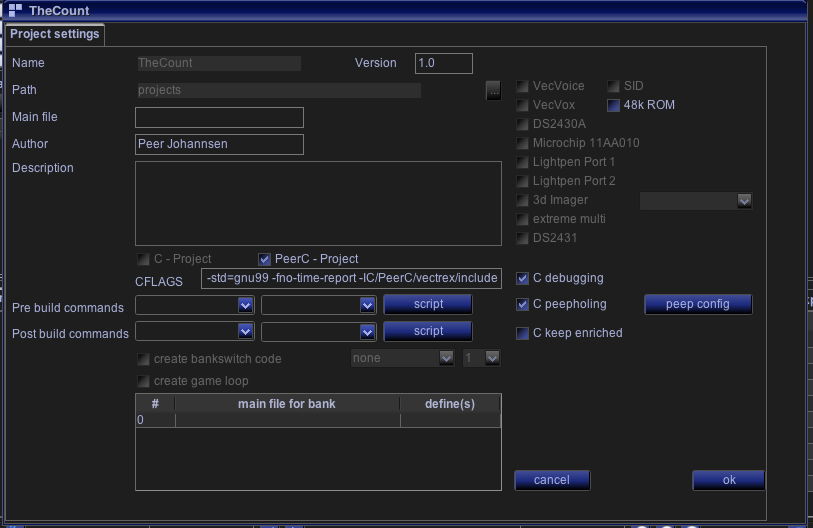
Peephole settings in project
Vide can analyse the generated (asm) source code of gcc. And if it finds some known deficiencies vide can alter the source code. This process I call Peepholing.
There are several such "Peephole" - rules defined, if the defined rule is found to be true - Vide changes the generated source with sources it deems better fit.
At the moment there are about 16 different rules - the rules are loaded from the filesystem from a file called : "VidePeepholes.xml". The definitions in this file won't help you understand whats going on, since nearly all actions are number encoded.
An editor for peepholes is also available (in configuration→miscellaneous), documentation is pending though. If you delete the XML file - a new one will be generated by Vide with the default rules Vide knows.
If you want to learn more about the defined rules, you can look at the source code in the package: "de.malban.vide.vedi.peeper"
This section in in development.
Following is taken from the source documentation:
What it does:
Always 10 lines of source code are loaded and investigated. The Source is searched for patterns, if the patterns match for all rules one peephole has, the "replace" mechanism is triggered.
Lines The lines loaded are investigated whether they contain assembler statements (mnemonics) - only lines which countain assembler statesments are further investigated. All "mnemonic" lines of the loaded 10 lines are numbered from 0-10 (if there are non assembler lines in between, the numbering is DIFFERENT from those lines loaded).
All loaded "comment" only lines are placed IN FRONT of the resulting peephole code (if peephole applies). If within the lines of a found peephole there are any labels discovered, the peephole is discarded, since it can not be assured, that the label will be at the semantically same position as before.
If a peephole is triggered, the old lines will be replaced as defined in the result section of the peephole. The original lines will be added at the end of the newly generated lines as commentary lines with "; ORG>" in front of them.
Rules Rules (OnePeepRule.java) is one compare or "question" with a true false result. These single rules can be combined to "CombinedRules.java". Combined rules can have an arbitrary number of rules. One CombinedRule combines its "inner" "OnePeepRules" either with "OR" or "AND".
One Peephole can have an arbitrary number of "CombinedRules".
An assembler line is investigated for following facts (see ASMLine.java): (every string is converted to lower case)
mnemonic
label
comment
org (original complete line)
clean (original line without comment)
first (first operand as a string)
second (second operand as a string)
operandAll (the complete operand string)
firstReg (Register information about first operand, can be compared with "contains" - it can contain values like "abd", "x", "y" ...)
secondReg (Register information about second operand, can be compared with "contains" - it can contain values like "abd", "x", "y" ...)
storeLoadReg register that is instruction inherent (like LDA → A, STY → Y ...)
isStore (mnemonic starts with "st")
isLoad (mnemonic starts with "ld")
isLea (mnemonic starts with "lea")
isImmediate (value is loaded with a "#")
isBranch (instruction is a branch, pul# pc is not recognized yet)
isRegSave (instruction does not change a register)
isIndexChange (instruction contains a -y, --y, y+, y++ for any index register)
isExtended (is the instruction one with extended addressing)
page (if extended, than this is the extended address/256, -1 otherwise)
Most of these facts can be compared to with a rule, following rule-compares exist (see OnePeepRule.java):
"RULE NONE",
"RULE MNEMONIC CONTAINS",
"RULE FIRST OPERAND EQUALS",
"RULE SECOND OPERAND EQUALS",
"RULE FIRST REG CONTAINS",
"RULE SECOND REG CONTAINS",
"RULE IS LOAD",
"RULE OPERAND ALL EQUALS",
"RULE OPERAND ALL CONTAINS",
"RULE STORE LOAD REG EQUALS",
"RULE ORG LINE CONTAINS",
"RULE IS STORE",
"RULE IS LEA",
"RULE FIRST REG NOTCONTAINS",
"RULE SECOND REG NOTCONTAINS",
"RULE NO INDEX CHANGE",
"RULE STORE LOAD REG NOTEQUALS",
"RULE FIRST OPERAND NOTEQUALS",
"RULE SECOND OPERAND NOTEQUALS",
"RULE NO BRANCH",
"RULE NO REGISTER CHANGE",
"RULE IS IMMEDIATE"
"RULE IS EXTENED",
"RULE PAGE EQUALS"
A rule is always aplied to one specific line.
Example:
OnePeepRule r1a = new OnePeepRule(RULE MNEMONIC CONTAINS, "tfr",0);
OnePeepRule r1b = new OnePeepRule(RULE FIRST OPERAND EQUALS, "d",0);
CombinedPeepRule c1 = new CombinedPeepRule(r1a, r1b, COMBINE AND,0);
This combined rule consists of two single rules. The single rules (r1a and r1b) are combined with an "AND" and are applied to line "0" (last parameter of the CombinedRule). Both rules are very simple - they "ask" simple question, simplyfied they check if the first assembler line is of the kind "... tfr d ...".
OnePeepRule r2a = new OnePeepRule(RULE MNEMONIC CONTAINS, "exg",0);
OnePeepRule r2b = new OnePeepRule(RULE FIRST OPERAND EQUALS, "d",0);
OnePeepRule r2c = new OnePeepRule(RULE SECOND OPERAND EQUALS, "%0o2",0);
CombinedPeepRule c2 = new CombinedPeepRule(r2a, r2b, r2c, COMBINE AND,1);
First part of the rule is nearly the same. The third single rule does a compare with a previous line. To do this placeholders are used.
Placeholder
Placeholders can be used to compare parts of one assembler line with parts of other assembler lines.
each placeholder starts with a "%" (percent)
followed by the line that the placehodler denotes (zero based - MNEMONIC containing lines! (see above) ).
followed by an identifier to what part of the original line it refers to,
Identifier
m mnemonic
o1 first (as defined above)
o2 second (as defined above)
r1 firstReg (as defined above)
r2 secondReg (as defined above)
oAll operandAll (as defined above)
rsl storeLoadReg (as defined above)
org org (as defined above)
comment comment (as defined above)
Result
If a peephole is discovered as being valid (all CombinedRules are true) - the sourcecode is changed, and the "result" of a peephole is applied. A peephole can have an arbitrary number of results (lines). Each "OneResult" represents one output line. The outputline is generated with the same identifiers as given above.
E.g.
OneResult e1 = new OneResult(0,"%2org");
OneResult e2 = new OneResult(0," tfr d,%0o2");
OneResult e3 = new OneResult(0,"%4org");
These result definitions outputs 3 lines.
the original 3rd line (zero base line count)
a new line "tfr d," + the second operand of the first line.
the original 4th line (zero base line count)
Have fun!
Peephole settings in project
Here you can switch on/off the complete peephole handling.
(Following is now in configuration)
If you press "peep config" another dialog opens, where you will be able to configurate peepholes.
As of now - you can switch individual peepholes on and off, and can also add your own new peepholes via an editor accessable under configuration→miscellaneous.
(documentation pending)
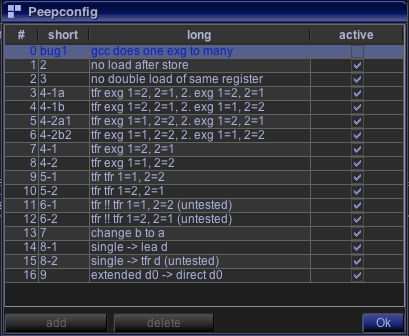
Peephole config