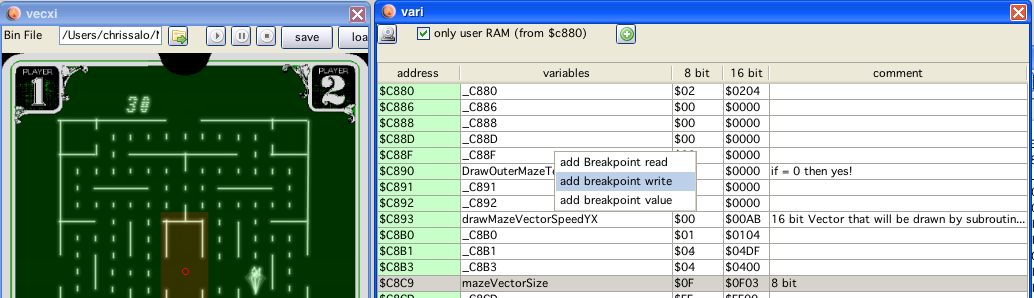
vari window
vari window
Well - also straight forward... all known variables (named RAM-locations) are shown.
You can update the variables name on the fly, the disassembly in dissi will reflect the changes, all references to the variable will be updated.
Same with comments.
Editing
Of the data columns of the table is supported (8bit and 16bit). The corresponding memory location is updated with the given values.
all known...
In case you need more than all known locations, you can add locations using the  button (this mainly comes handy if RAM-locations are used via accessing with the use of the DP register)
all RAM locations *
In case you do not want any "selection" at all - switching this on will show all RAM locations.
switch of display of BIOS variables *
Does what it says.
breakpoints
As shown in the image above, you can also set breakpoints to ram locations.
read: triggered when the ram location is read
write: triggered when ram location is written to
value: triggered when ram locations is written to with a certain value
use label as data You can force a label to be also be recognized as "immediate data". If you force that, dissi is able to use an address in immediate addressing.
That means, if e.g.
$c880 has a label start_ram
and an assembler directive like:
LDU #$c880
is encountered, dissi than can recognize the immediate label and output:
LDU #start_ram
... for better readability.