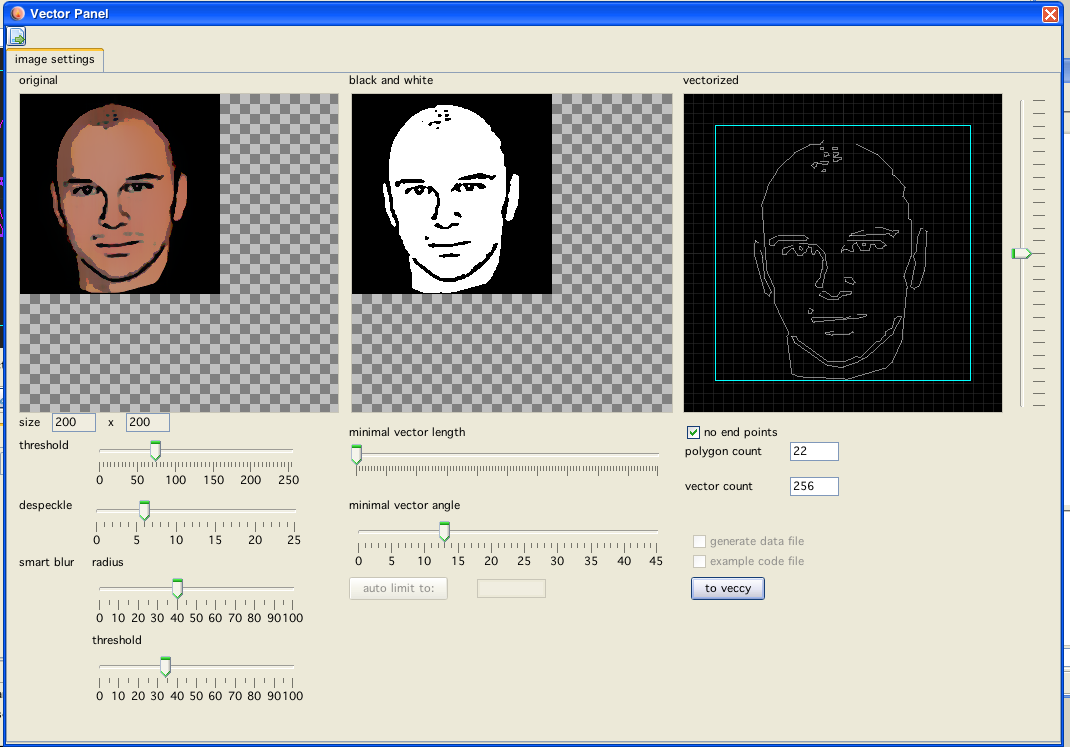
vectorized image
vectorized image
Using this panel you can convert raster images to vectorized images.
This panel is accessable from vedi and from vecci. Output of source code is not directly supported, you have go "thru" vecci.
The conversion is done in a number of steps:
The orginal image is loaded
The original image can be "transformed" using despeckle and/or blur tools, to be less noisy
These transformations are visible on screen in the left most panel
The image is than converted to black and white, for this also a threshold can be given
The resulting image is displayed in the middle panel
The b/w image is than shoveled to potrace (an external program)
The resulting vector informations are loaded and the configurable transformations:
minimal vector length
minimal vector angle
are applied.
The resulting "vectrex"- vectorlist is displayed in the rightmost panel.
Additions
Upscaling
Upscaling might be interesting if you intend to vectorize snall parts of an image. Internally the image is enlarged by the factor given (by the slider), and after that upscaling the vectorization is done. Sometimes the result looks more exact.
Factors
Also an X or Y factor can be given. Using these values the resulting vectorlist can be strechted or compressed in the corresponding direction
Note!
This is the only place where Vide makes use of an external program and this tool therefor might not be available on all installations.
With Vide I provide potrace for Windows (32bit/64bit), Mac (32bit/64bit) and Linux (32bit/64) I have tested most of these configurations, if there are any problems, please consult Malban!
The reason I used potrace as an external program is simply that I didn't have the energy and/or interest, to translate the open source software (potrace) to java just to build a cool (but probably seldom used) feature!
The idea to that menu entry was born while doing the "badapple" tryouts (see blog: http://malban.de/extreme-vectrex-reproduction-of-badapple).
A while I thought about implementing my own "conversion" routines, but after doing some diggings for algorithms and what would be needed, I decided to take a shortcut and let the main conversion being done by potrace. There are binaries available for nearly every OS-brand. Vide now sports a directory: "externalTools" which contains binaries for win/mac/linux in 32bit and 64bit version. Potrace is called from Vide, my testing showed it works on my systems rather well (tested: Win32, Win64, Mac64 and Linux32).
Potrace does only accept b/w images and only bmp, but can generate (with the right settings) nice vector images, even usable for vectrex purposes. If interested, for the images Malban used the same values SpritesMods used, namely:
potrace -a0 -O1 -bgeojson -ooutFile inFile
-a0 :is alphamax = 0 → output has no smooth corners, it is a
polygon, not a spline
-O1 :set the curve optimization tolerance, one is very high
inaccurate but less vectors
-bgeojson :output in json format (easy readable)
Generating the BW image is done by using a simple "Threshold"-Filter (threshold can be configured). The resulting json-datafile which is generated by potrace is read by Vide and post-processed. Here again I took lead by the groundwork done by SpritesMods - as you can see in the above image, two other parameters can be set:
minimal vector length
minimal vector angle
Vectors which are shorter then the given length are "joined" to their neighbours (or totally omitted) and vectors which have an angle less than the given value in relation to each other are also joined. Using these reduction scheme one can generate âtolerableâ vector images.