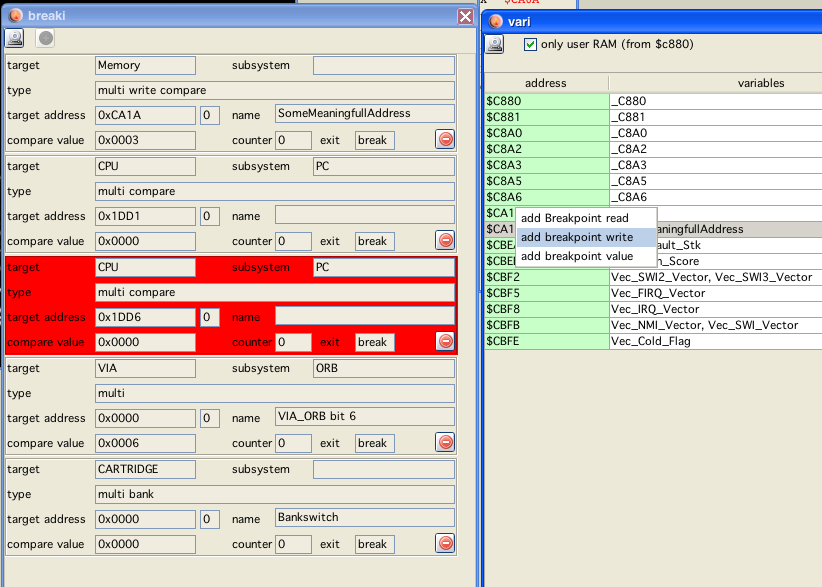
breaki window
breaki window
not finished yet!
Breakpoints now be saved and loaded, use the load save buttons for that.
In the lower right corner is a "clock" button - with this you can temporarily disable/enable breakpoints.
This is the beginning of a breakpoint list window. Although it is functionally working I don't like the looks of it.
The display lists all known information of all breakpoints, although to "normal" user this information may seem cryptic.
It displays all known breakpoints in a list. The current "break" is highlighted red (only once, for one single "step").
To delete a breakpoint press the corresponding  button.
As of yet it is not possible to add new breakpoints via this panel.
Notice!
Not all type of breakpoints are implemented yet!
Some more cryptic information
Target:
Memory
All breakpoints related to memory locations
CPU
All breakpoints related to CPU, there are possible sub-systems:
PC - implemented
A
B
D
X
Y
U
S
CC
DP
Cycles - implemented
Special - implemented [only internaly used!]
Analog
not implemented
VIA
only VIA ORB implemented
PSG
not implemented
Cartridge
implemented bank switching breakpoint.
Port
breakpoints on going high/low can be placed on the joystick IO "ports" (accessable via the ani window).
type:
A combination of following "types":
ONCE
Breakpoint is executed once and then dicarded.
MULTI
Opposite of "ONCE", breakpoint is not discarded when hit.
READ
Breakpoint is triggered by some sort of "read".
WRITE
Breakpoint is triggered by some sort of "write".
INFO
Breakpoint does not "break" the execution, but displays some sort of information.
COMPARE
Some sort of comparisson is needed for the breakpoint to be triggered
HEY
Breakpoint has its origin in the comment of the source - "Hey dissi"
BANK
Breakpoint is a bankswitch breakpoint.
BITCOMPARE
Some sort of "bit" comparisson is needed for the breakpoint to be triggered
CYCLES
Breakpoint is triggered by some sort of cycle information.
QUIET
Triggered breakpoint is not shown to the user.
target address:
If a target address of some sort is provided (memory/ram...), and also the bank.
name:
Some generated name.
compare value:
If a comparisson of any sort is needed, this is the value the breakpoint compares its target to.
counter:
not used (yet).
exit:
One of:
break
Does actually "break" execution.
info
Gives out information, does not break.
(now that I write this... this seems to be redundant with the above given type... hm...)