raster image
raster image
On a popup you can convert images (png, bmp, gif and jpg) to vectrex raster images, but I wouldn't get my dreams up to high, image results in resolutions greater than about 150x100 "pixel" are probably out of the 30000 cylce limit! Raster display routine were hacked together in one afternoon, so you are invited to get more performance out of it!
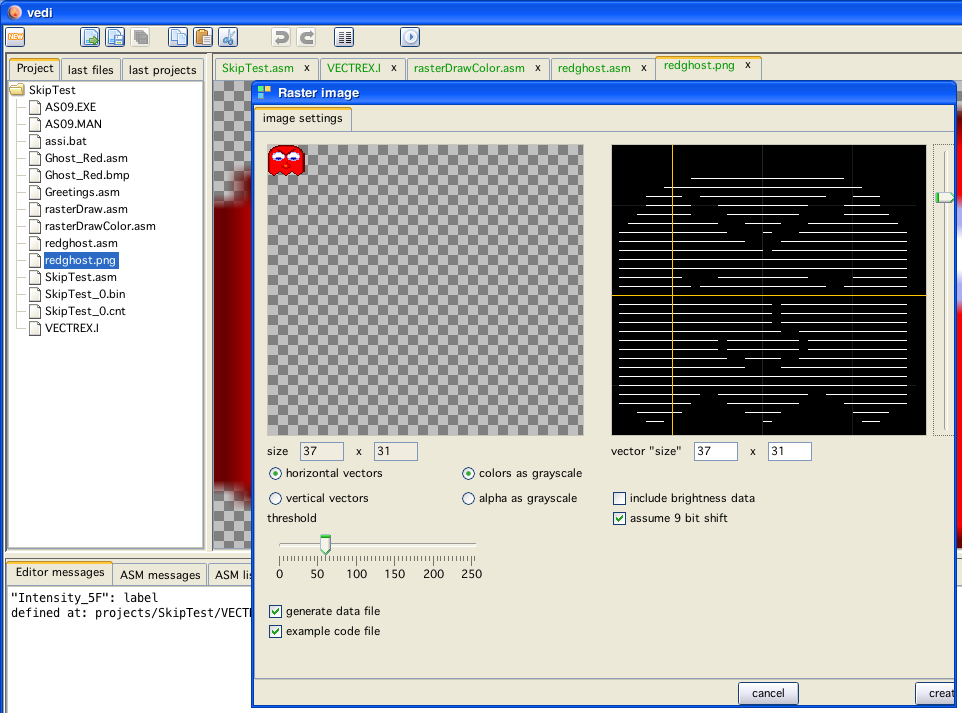
Above you can see the actual conversion "tool". As one can see it is not completly finished, but it will probably stay the way it is implemented now for quite some time.
The image (or part of the image, click and drag to select the image part) to convert is taken from the right clicked popup from above, the size is displayed.
Using "click" and "drag" - and thus build a selection in the source image - you can also use only partial image conversion.
On the left side you can see a "generated" vector image (the left slider zooms in/out), below the vector display you can give the resulting size - with this it is possible to resize the image any way you like.
One can chose what information to take for vector generation, the "color" - strength of a pixel (r+g+b/3) or the alpha channel. The slider on the right/bottom can be used to enter a threshold at what value a vector will be generated.
Also taken into account (although this could be optimized) is the fact, that shift register values are actually 9 bits instead of 8 (the last bit is repeated), the displayed vector list is updated with every change.
There used to be an option to include "brightness" data for the vector list. The generation routine is still in the code but disabled, since it performs so very badly, creating has been disabled.
The last option is "invert" - which does exactly that - all generated "0" are converted to "1" and vice/versa.
Using the checkboxes to the left and the create button to the right generates code (and an example main program).
The data is output in binary-data-statements, that way (with some fantasy) you can still discern your image, although this is made more difficult with each alternating line, since the display routine is bidirectional, meaning the data of every second line is stored "backwards".
You can also generate uni directional data, for the difference of the two formats, look at the section in "Code Generation".
The format of the data is described in the (generated) source.